This is a personal review for a project which had lasted for almost a year long and was just finished in Feb 2025.
For complying my current employer's privacy policy, snippets in this post were replaced with desensitized code examples. But the examples expressed the same thing.
The Preparation
Before all, what is Polymer?
It's a JS library based on Web Components. Here is the official website: https://polymer-library.polymer-project.org/.
Look at npmtrend.com, the monthly download data is:
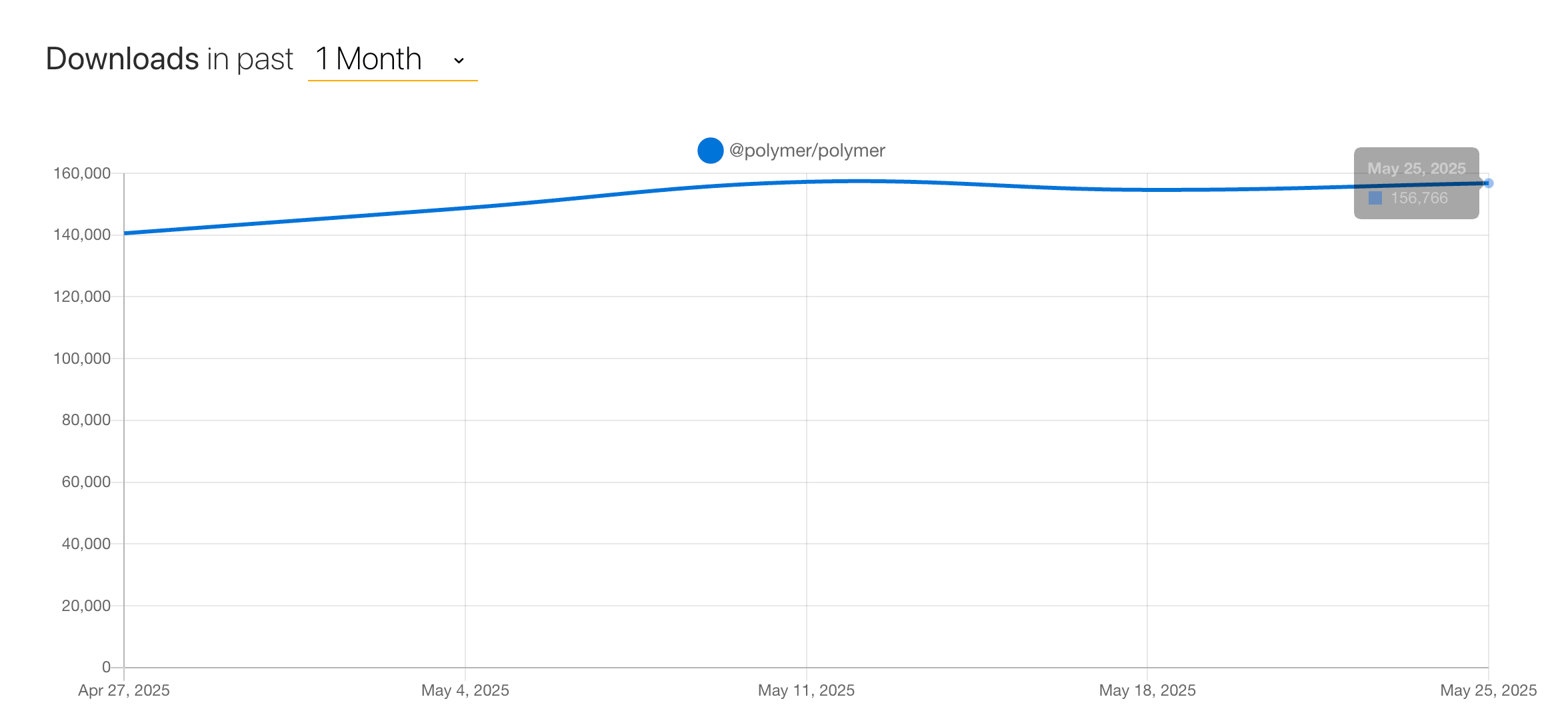
From my experience, I wouldn't recommend it as the bedrock for a 50000-line project.
Decided to Leave Polymer
The team had declared the library was in maintenance mode. It was a concern that someday in the future, many of the node modules we were relying on would be deprecated.

Beside the worry of Polymer's future, there was also organizational need to clean up tech debt.
The team decided to move on to another framework for the future.
Review
Maintenance mode doesn't neccesarry mean the library and its ecosystem will be gone and abondoned at least in the near future.
If we can buy more time to get familiar with the code, I think it's possible to migrate to React without touching the bussiness logic.
Chose Lit over React
We took over the project from another team, after the team had left for some reasons...
They left behind bunch of user stores and confluence pages. The effort for understanding those materials would be unbearable for the team at the time. Budget was limited, resources was either.
So goal was narrowed down and set as making sure the project can be maintained and enhanced in the future.
With above, Lit was the better choice. It has similar syntax and notions. Lit documentation also includes many content about how to migrate from Polymer, like this one: https://lit.dev/articles/lit-for-polymer-users/.
Review
Like mentioned in the previous Review section, it might be feasible to migrate to React.
Especially after completing the migration and having a high level understanding on the project, I feel like it's more feasible.
But the tradeoff would be moving to React needs to break more structure of the code than Lit.
For example, Polymer supports mixin, Lit does also, but React doesn't.
That means we need to move functions with bussiness logic out from mixins, and compose them as React hook or utilities, which is undoubtedly more time-consuming.
The Migration Principle
We made a list of principle that we think we should follow:
- Should never touch the old files, should always create a new file under the same folder with extension
.*.lit.ts - Should migrate the high level component first, e.g. wrappers of bunch of basic components in a page-level component, leave the basic component like textbox, button behind.
- Reason: we didn't know where were all those buttons and textboxes, couldn't guarantee all the stuffs were still working correctly if replaced them.
Review
I still believe the 2 points above are correct.
Turns out keeping old files intact was critical important for debugging, we found and solved a lot of bugs by simply comparing the code logic.
Migrating from high level component is also the right decision.
The background you might need to understand first is the output of both Polymer and Lit is just a custom element that is supported natively by browser vendors.
Which means you can use the 2 in mixture way and also makes it possible to leave the basic component intact until all high-level component were migrated.
Choosing UI Component Library
I guess Google used to plan Polymer a platform. The framework comes with a comprehensive UI component library, all put under the scope
@polymerBeside those under
@polymer@vaadinBut Lit doesn't have this, we mainly compared 2 libraries on GitHub:
UI5 is the one having the most components. But we tried high-level component like date picker, the performance was poor and the UI didn't feel smooth.
Spectrum is a set of low-level components. You need to build on top of them to meet your own need. It is in great quality.
We decided to go with Spectrum.
Review
Spectrum is crafted carefully with extendability in mind. For example the CSS variables it provides are very easy to use.
Also we found that there was in fact not much need for high-level component like date picker.
At the end, we still spent plenty of time on customizing components like textbox, combobox, autocomplete and numeric input.
It was not difficult as the source code of Spectrum is somewhat easy to read.
The con is the documentation misses many details, sometimes you have to read the source code yourself to gain information.
But simple is better than complex, I still feel like choosing Spectrum is the right decision.
Handle Mixin Jungle
Give you an example for simulating the first expression when I saw how the Mixins were put together:
class Component extends mixinA( mixinB( mixinD( mixinC( mixinH( mixinF( mixinJ( mixinE( mixinG(Polymer) ) ) ) ) ) ) ) )
First thing you might notice is the level of nesting, the nesting in the project is only deeper.
I was quite shocked when I saw this for the first time.
This also triggered the feeling for the first time that this project might be way more difficult to handle than I thought.
The challenges about Mixins were:
- The deep nesting of Mixins made it very difficult to debug and handle, for example the lifecycle hooks and the place triggered the state changes.
- The type system was disabled and we could only locate the source of a method on
by searching globally in the project.this - After enabling the type system, we faced another challenge, the order of Mixins were in chaos .
We spent a lot of time on each of the challenges above. Especially for the 1st point, it was so painful to debug the state changes that buried deeply in the Mixin jungle.
Review
To be honest, we could remain the Mixin jungle as it was, then we wouldn't need to figure out the correct dependency relationship between them.
The correct dependency relationship was only useful for quick reference to the function declaration for where the function was called.
But I think it is still worthy. After that, it was so much easier to debug.
Handle Implicit Data Change
I mentioned the lifecycle methods were hidden in different mixin files, so did the statements and functions for changing UI state and composing the request payload!
For example, after submitting an order, we observed the buttons in the footer of the order placement dialog would change to another state.
Or once the order placement dialog is opened, data of 2 dropdown menus was loaded and composed for UI display.
Or after keying in prices, a request for calculation total cost was sent.
The UI of the 3 things above was in the same page, but the logic was in 3 different files.
The project used Redux. All state changes would dispatch to a big store. Then components consume the store based on their own needs.
Review
For this part, there wasn't much we could do to improve the situation.
We added some code comments hopefully by which we could locate where triggered data changes more easily.
Tooling
Along the way, we built 2 tools to improve the situation.
Code Analysis Tool
This tool is simply a script for calculating how many lines of code and files were to migrate and marking those polymer source file with corresponding migrated Lit source file.
The reason we built it was we felt it was quite urgent to find a way to understand the word load.
Back then, we solely relied on observing UI components on the page, which obviously couldn't be lasting long.
Review
Turns out the tool was somewhat helpful. After 1 sprint, we ran the tool to see how far we had advanced and how far it was to the destination.
Polymer-to-Lit Compiler
We also built a semi-auto compiler for translating Polymer file to Lit file. By semi-auto compiler, I mean the tool couldn't guarantee the compiled code was runnable.
The tool could only help to translate the basic things of Polymer to Lit:
- Component class declaration
- Property definitions
- Observers with string value,
- Template Syntax
After translation, large chance that the code was not executable, manual check was required, especially for template syntax of bi-directional binding.
Review
The places with bi-direction syntax in polymer template should have been translated more carefully. The compiler also introduced some bugs, because of the bi-direction syntax was translated directly into Lit syntax.
We could have enhanced the compiler to leave comments near bi-direction syntax for afterward checking.
The End
This project is painful, but also rewarding.
If you come across to this post, hopefully the experience here can be useful for you.